Move slowly to find the floor
A surface
Set it down on the floor
The camera maps the floor, table or wall in front of it, so a model can be put down at its real size, turned and walked round. Nothing needs printing first.
Seen in
Some things are easier to judge, buy or learn when they are in the room at the right size. Augmented reality puts them there through the camera of a phone or tablet, so people can walk round them.
The idea Let people walk round the new building before it is built
What it is
Augmented reality uses the camera of a phone or tablet to lay 3D models, animation, text and film over what is really there. The room stays real. The thing you want people to see is added to it, at full size or as a scale model.
Because it sits in the real world, people judge it the way they judge real things. They walk round it, lean in and see it beside the sofa or on the workbench where it will be used.
How it starts
Every experience holds on to something in the real world. These are the five things it can use, and what the phone sees with each.
Move slowly to find the floor
A surface
The camera maps the floor, table or wall in front of it, so a model can be put down at its real size, turned and walked round. Nothing needs printing first.
Seen in
Point the camera at the page
An image
The app learns to recognise a picture: a poster, a sticker, a page in a book or a label on a pack. The content stands on it and moves when the page moves.
Hold still while it finds your face
A face
The front camera finds a face and follows it, so goggles, a mask or a character sit where they should and turn when the head turns.
Seen in
Walk on to the next story
A location
GPS ties the content to a real place, so it appears when someone walks there: a story on a hillside, a stop on a heritage walk or the pipes under a road.
Hold the phone up to the machine
An object
The app recognises a real object, from a product on a shelf to a piece of equipment, and puts labels, steps or animation on it, so instructions sit on the thing they describe.
Where it runs
Web AR opens in the phone’s own browser from a link, a QR code or a button on your product page, so nobody gives up at the download. Evonic Fires’ sales teams use it to show the range on a customer’s own wall.
When people will come back to it, collect things or need their progress recorded, an app is the better home. Zoggs has the same goggle try-on in its app and in the browser, so customers use whichever suits them.
Where it is used
The same phone does very different jobs. These are the ones we have built for, with a project for each.
The product in the room it is for, at its real size, with colours and options changed while people look.
Campaigns, promotions and try-ons that people play with and share rather than scroll past.
Machines at full size wherever the trainee is, with step-by-step guidance on the equipment itself.
3D models and field trips that turn a complex idea into something a class can walk round.
Medical information patients can see and follow, and procedures shown in 3D for the people who practise them.
Guides and history laid over the place itself, and something to do on the journey there.
A table, a room or a whole town turned into the level, with players sharing the same pieces.
In use
How we work
We work out with you what people need to see, where they will stand and what will start it: a surface, a page, a face, a place or an object.
Our 3D artists and animators build the content from your CAD files or from photographs of the real thing, and you try each version on your own phone.
Our developers build it and test it with you on the phones your audience uses, then release it to the web or to iOS, Android and Windows.
Phones and browsers change every year. We keep it working after launch and add to it with you when you want it to do more.
 Travel & Tourism
CrossCountry Journeymaker App
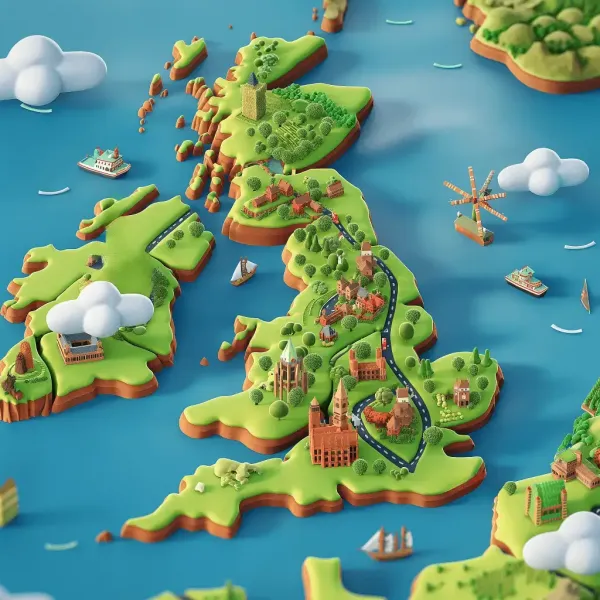
We partnered with CrossCountry Trains to create JourneyMaker, a free AR app packed with fun activities for young travellers. From...
Read the story
 Training & Education
AR Infrastructure Visualisation for Public Sector Field Teams
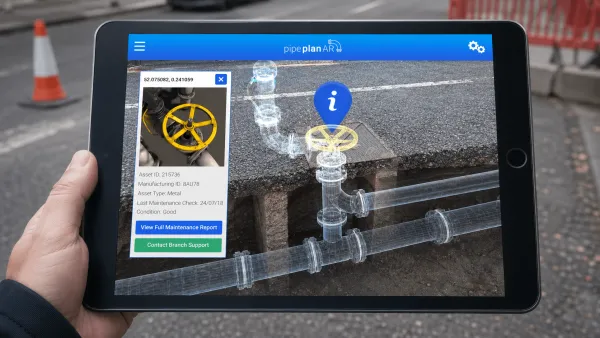
Harmony created a mobile augmented reality app for an overseas public sector client, giving utility and roadworks teams an “X-ray”...
Read the story
 Training & Education
Costa
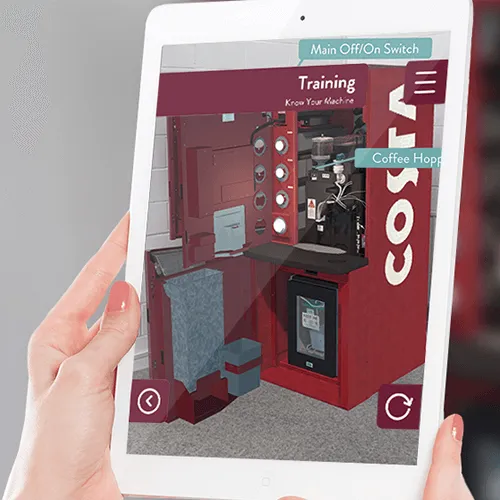
Costa is providing accessible and intuitive training and troubleshooting using augmented reality.
Read the story
Questions
Not always. Web AR opens in the phone’s own browser from a link or a code, and we have built several projects that way. An app makes sense when people will come back to it often or their progress needs recording.
One of five things: a surface such as a floor or a table, a printed image, a face, a place on the map or a real object. Which one suits depends on where people will be and what they will point the phone at.
Phones and tablets on iOS and Android, through an app or the browser, and Windows where a project needs it. We choose the platform with you once we know who will use it and where.
Yes. Colours, finishes, options and even their own artwork can be swapped while the model stays in the room, and people can take a photo to save or share.
Yes. Tell us the problem and we will work through it with you. Sometimes the answer is virtual reality, a browser experience or a film, and we will say so.
Your idea
Tell us what you are trying to explain, launch or change. We will work out with you whether this is the right medium for it.
Also in Immersive Experiences (XR)
Some places cannot be visited yet, are too risky to practise in or are simply too far away. Virtual reality puts people inside them at full size, wherever they happen to be.
Some experiences are better shared. Location-based VR maps a room in your venue to a virtual world, so a group can walk through it at the same time and talk about what they find.
Plenty of people will not install an app to look at one product. WebXR runs 3D and augmented reality in the browser they already have, so a link, a printed code or a button on your product page is all it takes.
A building on a screen is a picture. Tied to the plot it will stand on, or to a printed marker, it becomes something people can stand in. GLME, our geolocation and marker framework, shows the right content when someone reaches a spot or points their phone at a marker, and lets you change it all from one system.
Your turn
Tell us the idea you are trying to explain, launch or change, and together we will find the right way to tell it.