Want people to open it from a link?
Plenty of people will not install an app to look at one product. WebXR runs 3D and augmented reality in the browser they already have, so a link, a printed code or a button on your product page is all it takes.
The idea Let people walk round the new building before it is built
Try it now No app needed


- Turn it round
- Change the colour
- Put it in your room
Drag the chair or use the arrow keys. On a phone, the AR button puts it on your floor. The new building would open the same way.
What it is
3D and AR, opened like any other web page
WebXR is the web standard that brings augmented and virtual reality into the browser.
Someone taps a link and a 3D object appears in the page, ready to turn round or recolour. On a phone, one more tap puts it in the room through the camera, at full size, on the floor or wall where it would go.
Nothing is installed first. That matters to people who would never download an app to look at one product, and when there is no time to: a customer on your product page, or a sales visit in someone’s kitchen.
Web or app
When the browser is right, and when an app is
Both have their place, and sometimes the answer is both. This is how we weigh it up with you.
| In the browser | As an app | |
|---|---|---|
| Getting started | Tap a link, scan a code or press a button on your product page. | Find it in the app store, install it, then open it. |
| Who it reaches | Anyone with a recent phone, iPhone or Android, from one build. | The people willing to install it. |
| Suits | Moments people meet once: choosing a product, a campaign, a sales visit. | A tool people use often, or one that needs more than a browser offers. |
| In our projects | Andersen charge points and Evonic Fires. | Millenium Mats, previewing a business’s own artwork on a floor mat. |
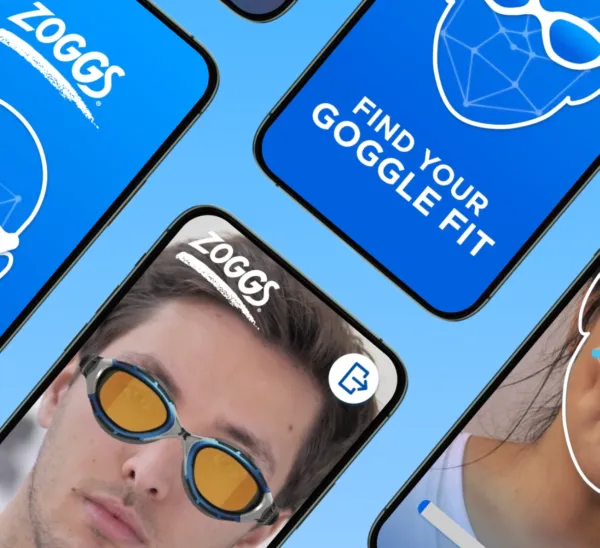
Both For Zoggs we built a goggle try-on app and a web version beside it, so more people could start in the browser.
When it fits
Four jobs web AR does well
-
Try it on at home
See a chair in the living room, or goggles on your own face, before buying, and judge size and style where it matters.
Read the Zoggs story -
Build it, then place it
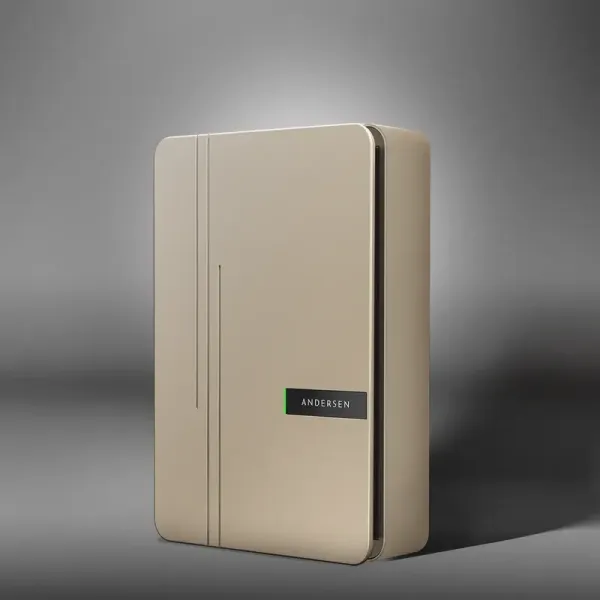
People change the colours and watch a live 3D model follow. Andersen customers try more than 240 colour combinations of a charge point, then put it on their own wall.
Read the Andersen story -
Carry the whole range
Evonic Fires’ sales team carries every fire on a phone or tablet and shows it lit, in the customer’s finish, on the wall where it will hang.
Read the Evonic Fires story -
Give a campaign something to do
AR filters and product previews give an audience something to try, not only to watch.
Also at work in
Training
The machine, life-size, with the labels on
A life-size, animated product shows staff how it works, helps customers set it up and walks someone through a fault on the object itself.
Training is often a tool people return to, which is where an app can be the better choice. We look at that with you first.
How we work
From CAD file to a link on your site
-
Plan it together
We work out with you who will open it, on what device and from where, and what it has to show.
-
Make the models
Our 3D artists turn your CAD files, or photographs of the real thing, into models light enough for a phone, with every colour and option set up.
-
Build and test
We build it and test it with you on the phones and browsers your audience uses, then put it live on your site.
-
Keep it working
We keep it running as browsers change, and add products and colours with you as your range grows.
Harmony set up the first AR tool for our A2 charge point and did so in a way that provided a meaningful benefit to our clients and prospects, not just being there for the sake of it like some tools.
-
 Consumer
Zoggs AR Virtual Try-On
Augmented Reality for Swimwear: Enhancing the Try-On Experience for Zoggs!
Read the story
Consumer
Zoggs AR Virtual Try-On
Augmented Reality for Swimwear: Enhancing the Try-On Experience for Zoggs!
Read the story
-
 Industrial
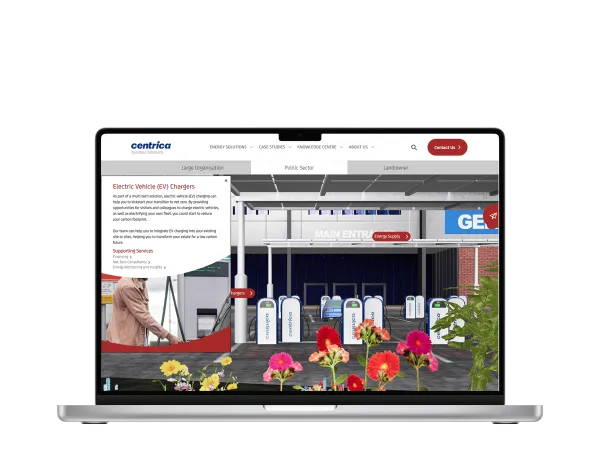
Centrica Business Solutions WebXR
Discover sustainable energy solutions with Centrica Business Solutions’ immersive 3D WebXR experience, crafted by Harmony Studios....
Read the story
Industrial
Centrica Business Solutions WebXR
Discover sustainable energy solutions with Centrica Business Solutions’ immersive 3D WebXR experience, crafted by Harmony Studios....
Read the story
-
 Retail
Andersen Charge Points WebXR
Andersen EV using the power of WebXR to display customised EV charge points, driving sales and consumer satisfaction.
Read the story
Retail
Andersen Charge Points WebXR
Andersen EV using the power of WebXR to display customised EV charge points, driving sales and consumer satisfaction.
Read the story
Questions
Good to know
-
Do people need to install anything?
No. It runs in the browser already on their phone, tablet or computer, opened from a link, a printed code or a button on your page.
-
Is WebXR the same as web AR?
Web AR is the part most people meet: a 3D object placed in the room through a phone camera. WebXR is the web standard underneath it, and covers virtual reality too.
-
Does it work on iPhone and Android?
Yes, from one build. On a laptop the page shows a 3D model to turn round, and on a phone people can also place it in the room.
-
Can it sit on our own website?
Yes. It can sit in an existing product page, as it does for Andersen’s charge points, or at its own address, shared as a link or a printed code.
Your idea
Talk it through with us
Tell us what you are trying to explain, launch or change. We will work out with you whether this is the right medium for it.
Also in Immersive Experiences (XR)
Other ways to tell it
-
Augmented Reality Development
Some things are easier to judge, buy or learn when they are in the room at the right size. Augmented reality puts them there through the camera of a phone or tablet, so people can walk round them.
-
Virtual Reality Development
Some places cannot be visited yet, are too risky to practise in or are simply too far away. Virtual reality puts people inside them at full size, wherever they happen to be.
-
Location-Based VR Development
Some experiences are better shared. Location-based VR maps a room in your venue to a virtual world, so a group can walk through it at the same time and talk about what they find.
-
GeoLocation and Marker Experience (GLME)
A building on a screen is a picture. Tied to the plot it will stand on, or to a printed marker, it becomes something people can stand in. GLME, our geolocation and marker framework, shows the right content when someone reaches a spot or points their phone at a marker, and lets you change it all from one system.
Your turn
What’s your idea?
Tell us the idea you are trying to explain, launch or change, and together we will find the right way to tell it.