Practical advice on keeping business apps secure, supported and working long after launch.

Getting an app live can feel like the finish line. After months of planning, development, testing and revisions, everyone wants to get it into users' hands and move on.
The problem is that the technology around the application keeps changing after launch.
iOS, Android, Windows and macOS move on. SDKs are updated. APIs are retired. Certificates expire. Third-party services change their requirements and security vulnerabilities are discovered.
None of that requires you to add a single new feature to your application.
An app that works perfectly today can gradually become unreliable, insecure or difficult to update simply because nobody has looked at it for a couple of years.
That is why maintaining an app is not the same as fixing bugs.
An app can stand still while everything around it moves
A business might have an application that has worked happily for several years. Nobody has asked for new functionality, users are not reporting problems and there seems little reason to touch it.
But while the application itself may not have changed, almost everything around it has.
A mobile app may have gone through several major iOS or Android releases. Apple or Google may have changed their store requirements, permissions may work differently and the development framework used to build it could now be several versions behind.
The same applies to desktop software. A Windows application can be affected by changes to .NET, WebView, code signing, security policies or the systems it communicates with. macOS applications have their own platform and signing requirements.
Then there are the things users never see. Most modern applications rely on external libraries, cloud platforms, authentication services, APIs, databases and other third-party systems. Any one of those can change independently.
Sometimes the consequence is minor. A dependency needs updating or a certificate needs renewing.
Other times an API is being switched off, a service changes the way authentication works or a framework reaches the end of its supported life.
The awkward moment is often when you suddenly need to release something.
Perhaps there is an urgent bug to fix or a business change that needs to go live quickly. The development team opens a project that has not been touched for several years and finds that the old build tools no longer work properly, several dependencies need replacing and simply getting the original application building again has become a job in itself.
Doing nothing is still a maintenance decision.
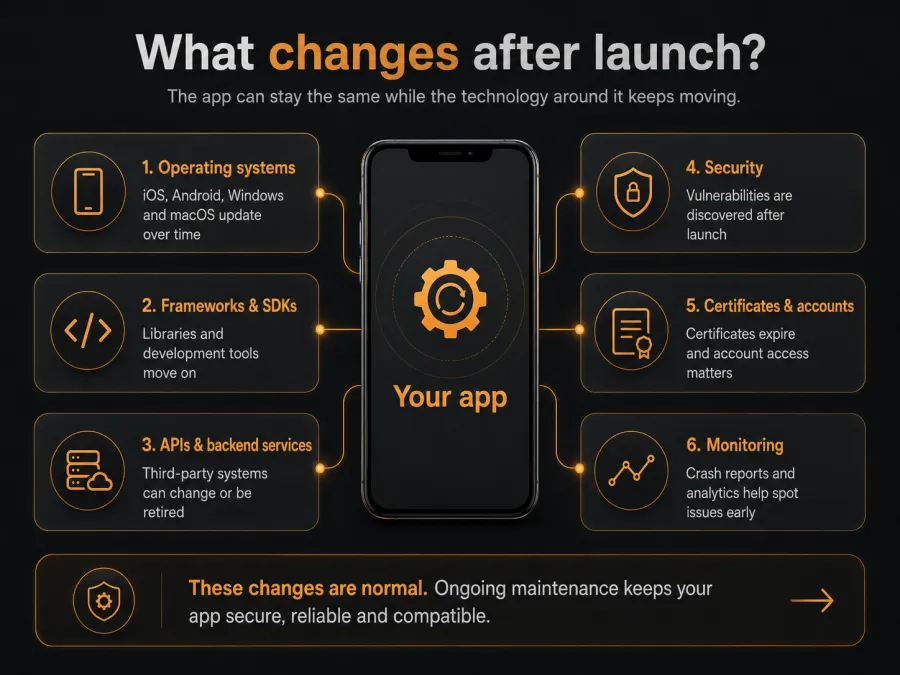
Security is part of maintenance too
Software vulnerabilities are routinely discovered after products have been released.
If your application uses an affected component, somebody needs to establish whether the vulnerability applies, what the risk is and whether an update is required.
That becomes much harder if nobody has been responsible for the application since launch.
A security notice referring to a particular framework or library is not very useful if nobody knows which version the product is running, whether the source code is still accessible or whether a new build could be released without first updating half the project.
This is becoming more relevant as expectations around software security increase. Regulations such as the EU Cyber Resilience Act place greater emphasis on vulnerability handling and security updates throughout the lifetime of digital products.
But the principle makes sense regardless of regulation. If a business relies on software, somebody should know what it depends on and whether those components remain supported.
What sensible maintenance looks like
Ongoing support does not mean developers constantly changing a stable application.
For some products, months might pass without any development work being required. The important part is maintaining enough awareness of the product that problems can be dealt with before they become emergencies.
That could mean checking an application against a major operating system release, reviewing important dependencies periodically or dealing with a framework approaching end of life.
For mobile apps, it also means keeping an eye on changes made by Apple and Google. An app that has not been submitted for several years can sometimes need a surprising amount of work before a new version will pass current store requirements.
Backend systems need attention too. An application might look self-contained to the person using it, but its login, content, data, notifications or payments could depend on several services running elsewhere.
Then there are the mundane things that are very easy to forget. Developer accounts need to remain accessible. Signing certificates expire. API keys change. Domains renew. Third-party licences can lapse.
None of these are particularly interesting development problems, but any of them can stop an otherwise working product.
Basic monitoring helps as well. Crash reporting, analytics and user feedback can reveal that something has started going wrong after an OS or device update before a customer rings to tell you the app has stopped working.
Ownership matters
During active development, responsibility is usually clear. After launch, that clarity can disappear surprisingly quickly.
The hosting might sit with one supplier, the App Store account with the client, source code somewhere else and a third-party API subscription under an employee's login.
That makes even a small change harder than it needs to be.
A business should know who owns the source code and developer accounts, who controls hosting and external services, how security updates will be handled and who is expected to respond if something serious happens.
It is also worth asking whether another developer could take over the product if required.
Good source control, sensible documentation and clear ownership of accounts make that much easier. If the original developer is no longer available or you decide to move to another supplier, you should not have to reconstruct the technical history of the product before anyone can work on it.
If an application has already been left alone for a few years, that does not automatically mean there is a problem either. A technical review can usually establish whether it still builds with current tools, whether its main dependencies remain supported and whether anything needs attention before the next urgent change arrives.
Sometimes very little needs doing. In other cases, a small amount of preventative work can avoid a much larger recovery job later.
Practical app maintenance checklist
A sensible maintenance routine does not need to be complicated. At a minimum, it is worth checking:
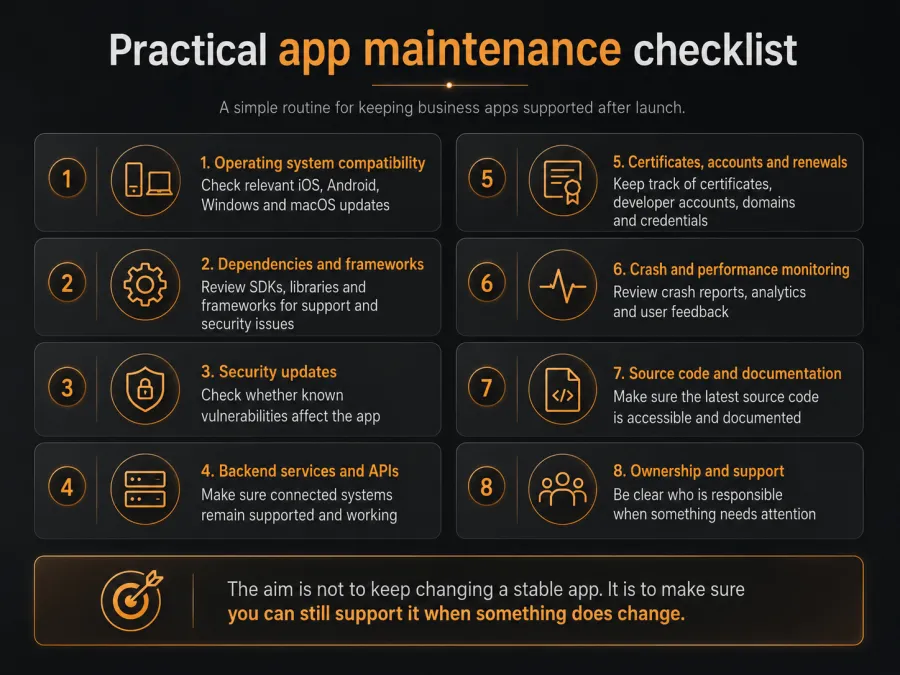
The aim is not to keep changing a stable application. It is to make sure you can still support it when something does change.
Launch is the start of the product's working life
A successful launch matters, but for many business applications the more useful measure is whether the product is still working reliably two, three or five years later.
That does not require constant development. It does require clear ownership, a little maintenance and some planning.
If you are commissioning an application today, maintenance should be part of the conversation while you are discussing the build. Agree who will own it, how it will be supported and what happens when the technology around it changes.
The launch date matters. What happens afterwards matters for much longer.

About the author
Kieran Sawyer
Your idea
Talk it through with us
Tell us what you are working on, from an early idea to a brief that is ready to go, and we will think it through with you.