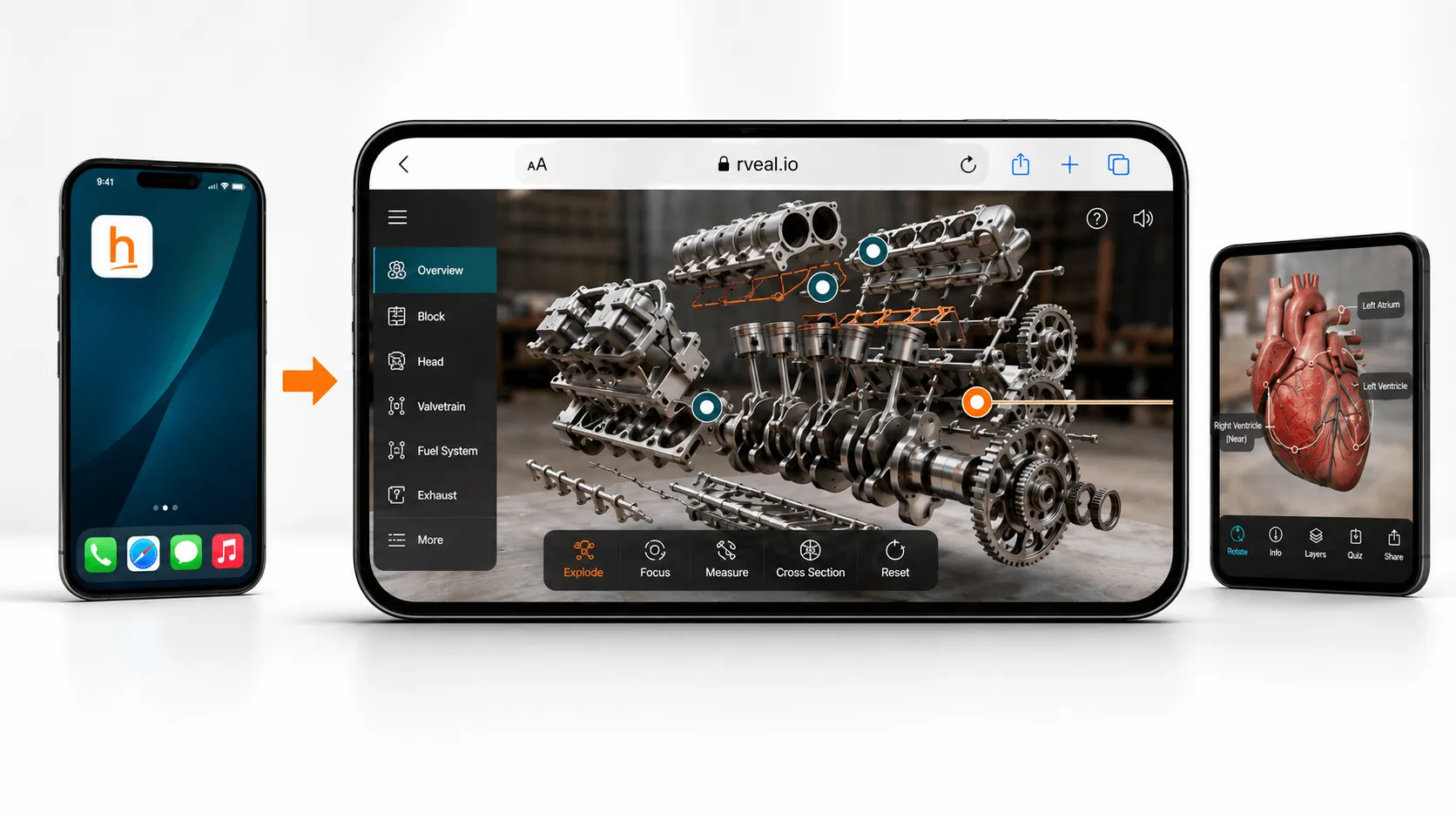
This is the third article in my short series on browser-based AR and how it can be used more practically across campaigns, products and customer experiences.
In the first article, I looked at access. If an AR experience starts with an app download, a lot of people may never get to it.
In the second article, I looked at capability. Browser-based AR is no longer just a simple 3D viewer. It can support branded interfaces, animated content, guided journeys, interactive features and app-like experiences.
This final article is about the commercial side.
Because once the excitement around AR settles down, most businesses come back to the same set of questions.
What will it cost?
How quickly can it be launched?
Can we measure whether people use it?
Will the assets have value beyond one campaign?
And is this a better route than building a native app?
Those are sensible questions. They should be asked early.
The app is often the expensive part
A native app can be the right answer. There are plenty of cases where it makes sense, especially if you are building a long-term product with accounts, saved preferences, regular repeat use or deeper device features.
But app development can quickly become a large commitment.
You are not just paying for the AR experience. You are paying for the app structure around it: design, development, testing, device support, app store submission, updates, maintenance and ongoing compatibility work.
For some projects, that investment is justified. For many campaign-led AR projects, it is not.
If the aim is to support a product launch, create a retail activation, enhance packaging, build an event experience or help customers explore a product, a full native app may be more than the project needs.
That is where browser-based AR can be much more practical.
A focused browser-based experience can often start from a few thousand pounds, depending on the idea, the quality of the 3D assets, the interaction design and the level of polish required.
That lower starting point matters. It lets businesses test an idea, prove value and learn from real users before committing to something larger.
It is easier to start small
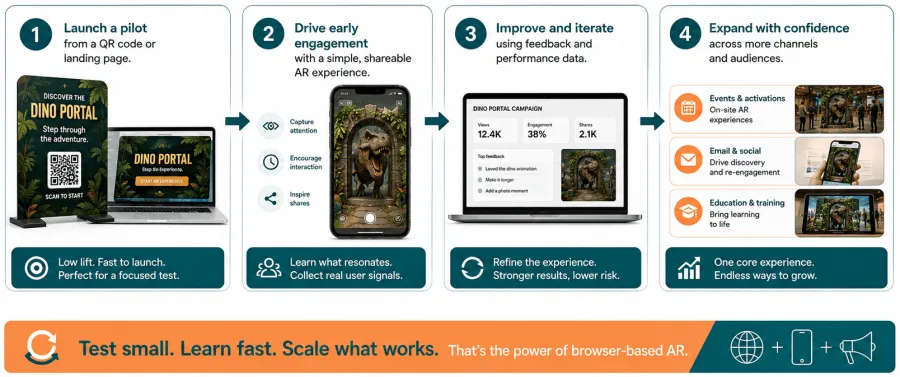
One of the useful things about browser-based AR is that it does not need to begin as a huge project.
You might start with a single product viewer. Or an AR packaging experience. Or a guided sales demo. Or a simple campaign activation that runs from a QR code.
If it works, it can grow.
More products can be added. The interface can be improved. The 3D content can be reused elsewhere. The campaign can be extended. The idea can be turned into a more permanent tool.
That is a healthier way to approach AR for many businesses.
It reduces the pressure to get everything right on day one. It also gives teams a way to learn what people actually use, rather than building a large app based mainly on assumptions.
For clients, that can make the decision easier.
They are not being asked to invest in a full platform before they know whether the experience is useful. They can start with a focused version, put it in front of users and build from there.
Measurement is part of the value
AR should not just look good in a presentation.
It should have a job to do.
That might be helping people understand a product, increasing confidence before purchase, encouraging interaction at an event, improving a sales conversation or making campaign content more memorable.
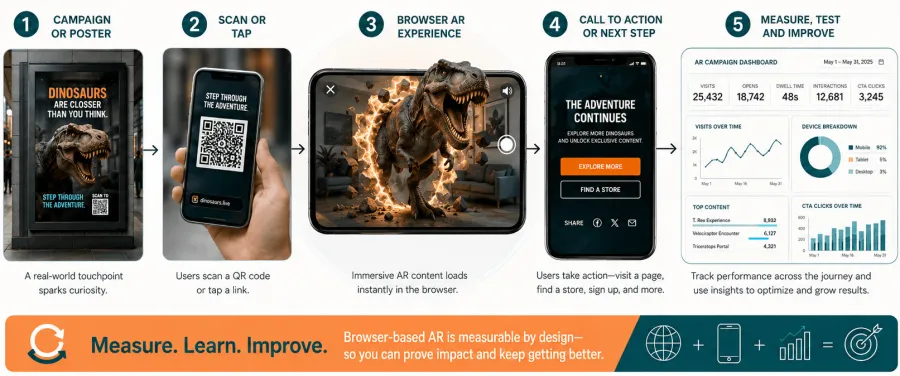
Because browser-based AR lives on the web, it can sit closer to the analytics and tracking businesses already use. You can see how people reached the experience, what they interacted with, how long they spent with it and what they did next.
That makes the work easier to judge.
It also makes it easier to improve.
If people are dropping off at a certain point, the interface can be changed. If one product configuration gets more attention than another, that can inform the campaign or sales process. If a call to action is not working, it can be tested and adjusted.
This is one of the reasons browser-based AR fits well into modern marketing and customer experience work. It does not need to sit apart from the rest of the digital journey. It can be measured and improved like other web activity.
Good 3D assets can work harder than one campaign
The 3D asset is often one of the most valuable parts of an AR project.
A well-made model does not need to live in one place.
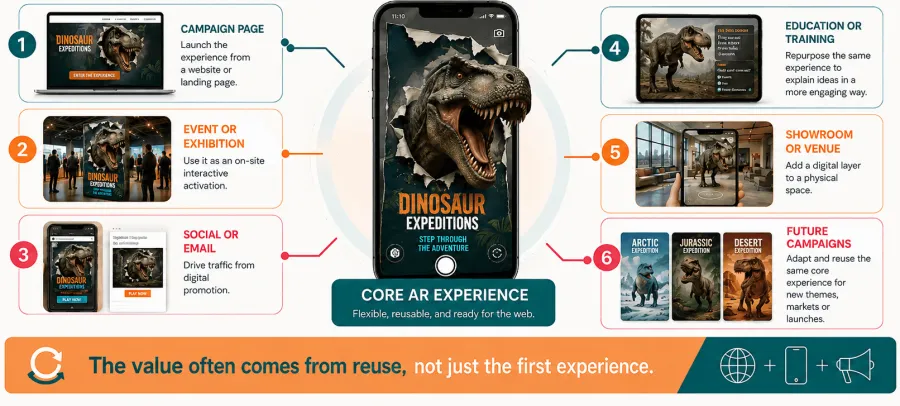
It can support a product page. It can sit inside a desktop 3D viewer. It can be used in mobile AR. It can appear in a sales presentation, an event stand, a showroom experience, a training tool or a future campaign.
That changes how the investment should be viewed.
You are not just creating one AR moment. You are building a digital product asset that can be reused across several touchpoints.
This is especially useful for product businesses. If a customer can explore a product in 3D on desktop, place it in their space on mobile and see the same asset used in sales material, the content starts to work much harder.
It also creates consistency. The product does not need to be recreated again and again for different channels. The same core asset can support multiple parts of the journey.
That is where the commercial value becomes more interesting.
Updates are simpler
Campaigns change. Products change. Messages change.
With a native app, updates can involve a longer process. You may need to rebuild, test and push a new version through app store approval. That can be fine for long-term products, but it is not always ideal for fast-moving campaign work.
With browser-based AR, updates can usually be made more directly.
A model can be swapped. Text can be changed. A call to action can be adjusted. A landing page can be updated. A new product option can be added.
That flexibility is useful for campaigns, events and product launches where timelines move quickly.
It also lowers the risk. If something needs fixing after launch, the route to making that change is usually simpler.
App-like does not have to mean app-store
There is another point that is becoming more relevant.
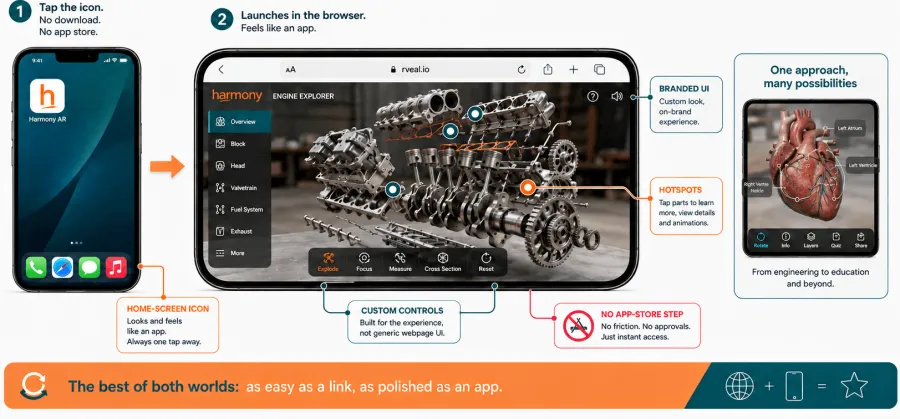
Browser-based AR can feel much more like an app than many people expect.
It can have branded UI, guided navigation, product selectors, buttons, animation, calls to action and clear user flows. It can also be saved to a user’s home screen with a branded icon, making it easier to return to later.
In some cases, parts of the experience can be cached for low-connectivity or limited offline use, depending on how it has been built and what the experience needs to do.
This does not replace every native app. It should not be sold that way.
But it does create a useful middle ground.
For many businesses, the goal is not to build a full app. The goal is to give users a polished, branded, easy-to-access experience that helps them do something.
The browser can now support that far better than many people realise.
The right route depends on the job
There are still times when a native app is the better investment.
If the experience needs regular repeat use, heavy graphics, deep device integration, complex offline behaviour, personal accounts or long-term platform features, an app may be the stronger route.
But for many public-facing AR projects, the browser is often a better starting point.
It reduces access friction. It can cost less to launch. It can be easier to measure. It can be updated more quickly. It can sit inside existing websites and campaigns. It can reuse 3D assets across several channels.
That combination is hard to ignore.
The question is not whether browser-based AR is always better than an app.
It is whether an app is really needed for the job the experience has to do.
Start with the business case, not the format
A good AR brief should not start with the technology format.
It should start with the problem.
What does the user need to understand?
Where will they be when they use it?
How much time and attention will they have?
What should happen after the experience?
How will success be measured?
Once those questions are clear, the route becomes easier to judge.
Sometimes the answer will be a native app. Sometimes it will be a browser-based experience. Sometimes it may simply be a better 3D viewer, a product page improvement or a smaller test before building something bigger.
That is the point of this series.
Browser-based AR is not just a cheaper alternative to an app. It is a practical way to put immersive experiences closer to the moments where they can actually be used.
For campaigns, product demos, packaging, events, education, retail and customer journeys, that can make a big difference.
The best investment is not always the biggest build.
It is the one people can access, understand and use at the moment it matters.
Series wrap-up
This article closes the short series on browser-based AR.
The first article looked at access and why AR does not always need an app.
The second article looked at capability and what modern browser-based AR can now support.
This final article looked at the commercial case: cost, measurement, reusable assets, updates and why the browser can be a more practical starting point for many projects.
If you are planning an AR project, the most useful question is often not “should we build an app?”
It is: “what is the simplest, most useful way to get this experience into the hands of the people who need it?”
Frequently Asked Questions
Want to learn more? Get in touch
Browser-based AR: a practical guide for brands and customer experiences
-
Does your AR experience really need an app?7 min read
-
-
Why browser-based AR is becoming a more practical investment12 min read

Kieran Sawyer has over 15 years of experience helping clients shape innovative digital and immersive solutions. He leads on strategy, combining commercial insight with creative technology to deliver impactful experiences.
Jun 11, 2026
12 min read