Does your AR experience really need an app?
Why browser-based AR can be a better starting point for campaigns, product demos, packaging, events and customer experiences
This is the first article in a short series on browser-based AR and how it can be used more practically across campaigns, products and customer experiences.
Most AR projects do not fail because the idea is weak. They fail because the route into the experience asks too much of the user.
That is easy to underestimate. You can have a strong product visualiser, a clever campaign idea or a useful exhibition feature, but if the first step is “download our app”, many people will never see it. They may be interested, but they are busy, distracted and not yet convinced the experience is worth the effort.
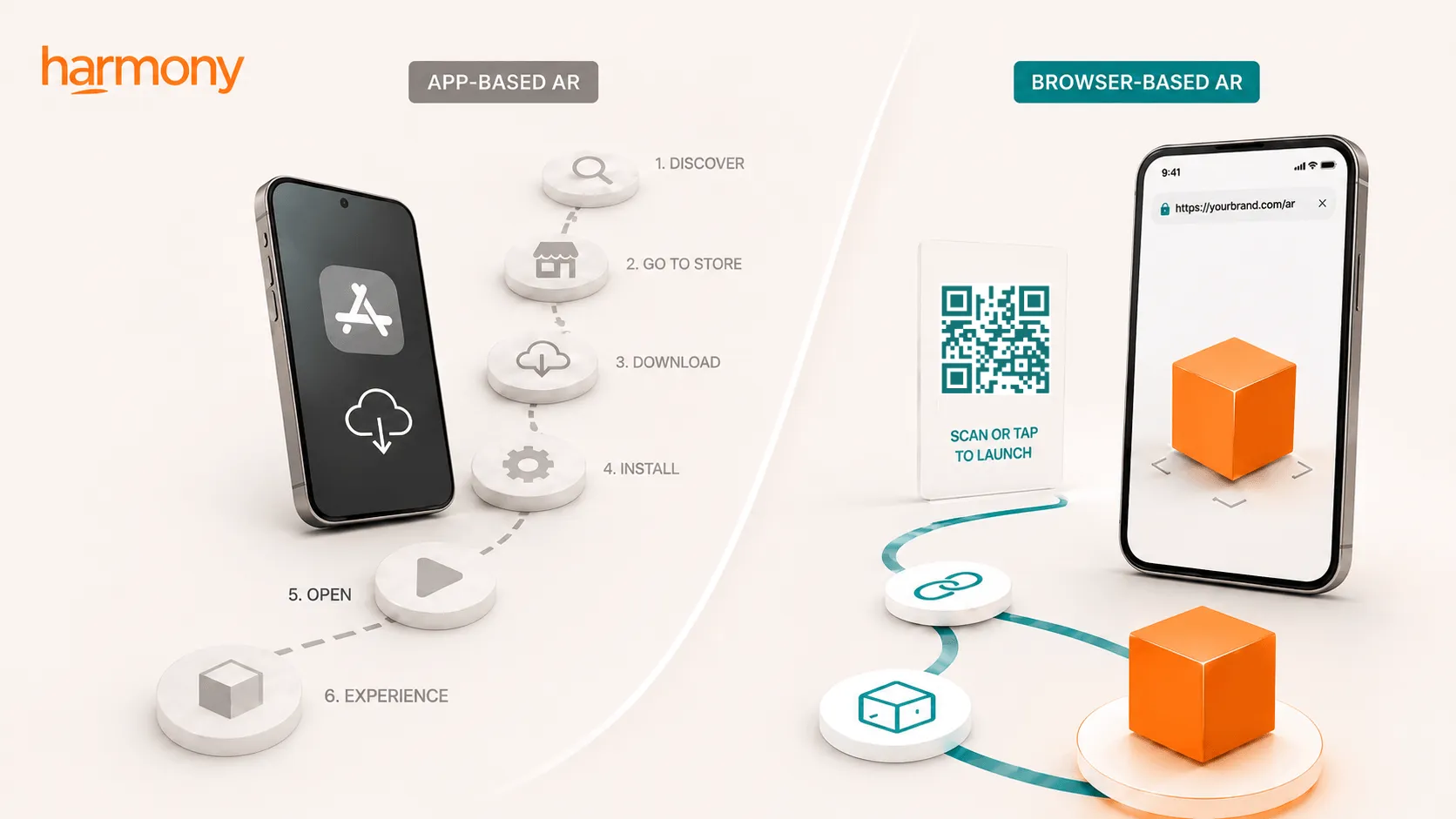
For years, augmented reality has often been tied to apps. If a brand wanted AR on mobile, the default route was to build an app, send people to the app store and run the experience from there. Sometimes that still makes sense. If you are creating something people will use regularly, with accounts, saved preferences, complex features or long-term value, a native app may be the right answer.
But for many AR experiences, especially campaign-led or public-facing ones, the app is not what improves the idea. It is what gets in the way.
The download is often the weak point
Think about the moment you are asking someone to interact.
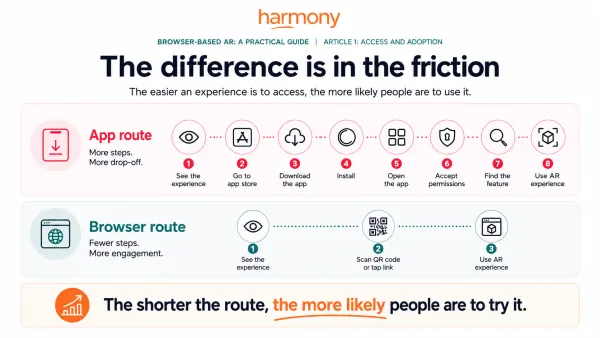
They might be walking past a poster, holding a product, browsing a page, standing in a venue or looking at packaging. You may only have a few seconds of attention. Asking them to leave that moment, open the app store, download something, accept permissions and work out where to go is a big ask.
Recent Clutch research found that 80% of smartphone users have downloaded an app because they were required to, rather than because they wanted to. It also found that 72% felt at least mildly annoyed by that experience, and 54% delete an app once they are done with it.
The useful part of that research is the nuance. People are not against apps. Many still prefer apps when they provide clear ongoing value. The issue is being forced to install something before seeing any benefit.
That distinction matters.
For a banking app, loyalty app, travel app or internal tool, the download may be justified. For a one-off AR product viewer, event feature or campaign experience, it can feel like work.
A shorter route into the experience
Browser-based AR changes the access point. Instead of sending someone to the app store, the experience can open from a QR code, link, product page, advert, email, social post or NFC tag.
That makes the experience much easier to place into the moment where someone is already interested.
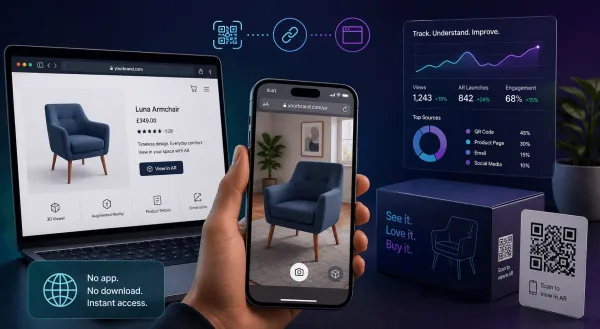
A product page can let someone view an item in 3D or place it in their own space. Packaging can trigger extra content. A poster can become part of a campaign. A venue can reveal information that would not fit on physical signage. A showroom can give customers another way to understand scale, detail or context.
The value is not just that it opens faster. The value is that it appears where it is useful.
That is often the difference between an AR experience people try and one they ignore.
AR should sit inside the journey, not outside it
One mistake I see with immersive projects is treating the experience as a separate destination. It becomes something people have to go and find, rather than something that helps them in the moment.
Browser-based AR is stronger when it sits inside the journey that already exists. If someone is on a product page, let them explore the product there. If they are holding the packaging, let the packaging trigger the experience. If they are at an event, make the interaction part of the space around them.
This also means the experience can sit alongside the things a business already needs: product information, enquiry forms, buying links, booking buttons, video, live chat or campaign content.
You are not asking people to leave the journey. You are making the journey more useful.
Measurement and updates are easier too
There is a practical business benefit here as well. Because the experience lives on the web, it can connect with the analytics and tracking many businesses already use. You can understand where people came from, how they entered, what they interacted with and where they went next.
That matters because AR should not just look impressive in a meeting. It should have a clear role in the customer journey.
Web delivery also makes updates easier. If a product model changes, a call to action needs adjusting or the campaign message moves on, updates can be made without pushing a new version through an app store process.
For short campaigns, events and product launches, that flexibility is valuable.
Apps still have a place
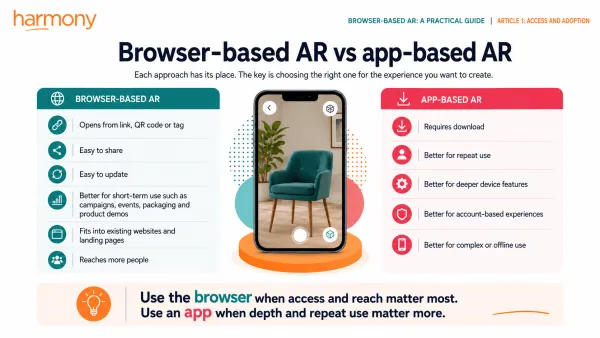
This is not an argument against native apps. They are still the right route for many products, especially when you need heavy graphics, deeper device access, offline-first behaviour, personal accounts or regular repeat use.
The point is more practical than that.
A lot of AR experiences do not need a full app. They need to be easy to open, easy to share, simple to update and simple to use at the moment someone is interested.
For many public-facing experiences, the browser is the better starting point.
Start with the access question
The first question should not be “Should we build an app?”
A better question is: “What is the easiest way for someone to use this at the moment it matters?”
Sometimes the answer will still be an app. But for campaigns, product demos, retail, packaging, events and exhibitions, the answer is often a link, a scan or a page the audience is already using.
That shift changes how businesses can think about AR. It does not have to be a standalone project hidden behind an install. It can become a practical layer added to products, places, packaging and campaigns.
The technology can be brilliant. But if people do not open it, it has already lost.
Useful AR starts by making access easy.
Next in the series
In the next article, I’ll look at what browser-based AR can actually do now, and why it is more capable than many people realise.